HTML5 just
leveled up to HTML6.
html5editor.com now opens HTML6, the newer, more advanced online editor. Faster and cleaner, with live preview and one-click cleanup. We'll take you straight there.
You'll be redirected automatically, or click to go now.
Build the web
Live preview as you type.
StartWhy people switch
Everything an HTML editor should be
No installs, no accounts, no clutter, just a fast, modern editor that shows your work the moment you type it.
Live preview
See rendered output side-by-side, updating in real time as you write.
One-click cleanup
Format, indent and tidy messy markup into clean, valid HTML5 instantly.
Runs in the browser
Nothing to install. Open a tab and start building on any device.
Free to use
Write, preview and copy your code without sign-ups or paywalls.
A quick primer
Types of HTML5 editors
An HTML5 editor helps you create and edit HTML5, the latest version of the language that structures content on the web. They come in a few flavors:
Text editors
Tools like text editors, VS Code or Sublime, syntax highlighting and speed for hand-coding.
The right fit
The best choice depends on your project and experience, for quick edits, an online editor wins.
The complete picture
Why an online HTML editor wins in 2026
Whether you are learning to code, prototyping a landing page, or cleaning up messy markup, a browser-based editor removes every barrier between you and a working page.
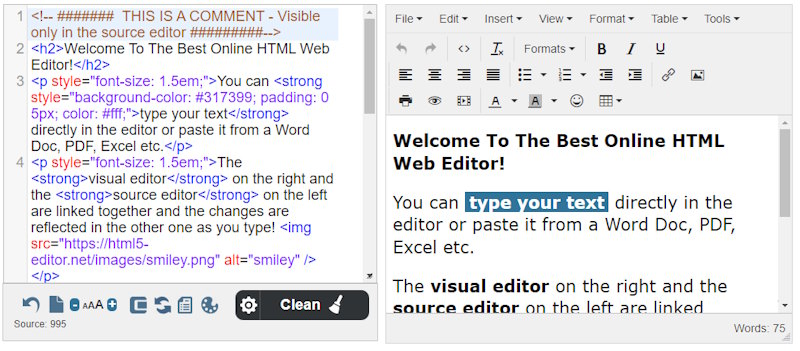
From HTML5 to HTML6
HTML5 reshaped the web. It introduced semantic elements like header, nav, article and footer, native audio and video, the canvas drawing surface, offline storage and form controls that finally matched what real applications needed. For more than a decade it has been the foundation that browsers, frameworks and content management systems are built on. Almost every page you visit today is, at its core, an HTML5 document.
HTML6 is the natural next step. The online HTML6 editor keeps everything you already know and layers on a faster engine, a cleaner interface and smarter tools. You write standard markup in one pane and watch the rendered result update instantly in the other. There is nothing to download, nothing to configure and no account to create.
Because it runs entirely in your browser, it works the same on a laptop, a tablet or a phone. Your work stays on your machine, the interface loads in a fraction of a second, and a single click copies clean, valid output you can paste straight into any project.
How it works in three steps
Write
Type HTML, CSS and JavaScript into the editor pane. Syntax highlighting keeps everything readable as you go.
Preview
See the rendered page update live beside your code, so you catch mistakes the moment you make them.
Clean up and ship
Run one-click formatting to tidy and validate your markup, then copy the result into your site, email or CMS.
Built for speed, not setup
Traditional editors and IDEs are powerful, but they do come with friction: downloads, updates, plugins, licenses and a learning curve before you write a single tag. An online editor removes this overhead completely. There is no installer to run, no environment to maintain and no version to keep in sync across your devices. The latest features are simply there the next time you open the page.
That simplicity matters most when you just need an answer fast. You can sketch a layout, confirm how a new HTML element behaves, or check whether a block of markup is valid without ever leaving the browser. Share a link, paste in a snippet, hit preview, and move on.
Writing clean HTML is also the foundation of good search visibility and accessibility. Well-structured headings, descriptive links and semantic elements help search engines understand your content and help assistive technology read it aloud. The editor encourages those habits by showing you exactly how your structure renders, every keystroke of the way.
What you can build in minutes
- Landing pages and hero sections
- Marketing emails and newsletters
- Blog posts and long-form articles
- Forms and contact pages
- Tables, lists and pricing grids
- Embedded video and audio
- Responsive, mobile-friendly layouts
- Code snippets to learn and reuse
One tool for every kind of maker
Students and self-taught coders rely on the instant preview to connect a tag with what it actually does on screen. Front-end developers keep a tab open as a scratchpad for quick experiments. Marketers and writers format content for newsletters and pages without wating on a developer. The same editor serves a complete beginner and a seasoned professional equally well.
Best of all, it stays free. There is no trial that expires, no feature locked behind a paywall and no email required before you can try it. When the countdown finishes you will land in the editor automatically, or you can open it right now and start building.